The Do's And Don’T Of Image Retouching
From the Urban Angles article archive
Editorial reference. Article-era roles, equipment, offers and market conditions do not establish current company policy.
The Do's And Don’t Of Image Retouching
When it works, great retouching works really well, truly advertising a property in its best light.
Our years of experience have made us experts in the field. The key is knowing the boundaries and what is acceptable editing. Almost anything is possible using Photoshop and 3D Rendering technology, given the required time and budget. But that doesn’t mean you can or should!
In this article, we’re bringing you our Top 8 DOs and DON’Ts for retouching real estate photography, based on our years of experience in the market.
DO
Remove temporary items
We happily remove temporary items that are not easily taken down on the day of photography, such as basketball rings. In doing so, we draw focus to the features of the property itself, without any unwelcome distractions to the eye.
DON’T
Remove permanent fixtures
As a general rule, we do not remove any permanent fixtures such as power lines or a neighbouring block of units.
DO
Add colours or grass if property alterations are actually occurring
We’re also happy to add lush grass or change paint colours when we’re aware that these things are being altered for the sale of the property.
DON’T
Use people in your photography
Prospective buyers want to imagine themselves in the home, as well as viewing the property in terms of its marketability and house features. Adding people to photography takes away the buyers’ ability to visualise themselves in the space, and adds unwelcome distraction.
DO
Remove visual distractions
For builders and architecture packages, we create idealized versions, removing inconveniently placed neighbours or visual distractions. This allows the property to be showcased in all its individual glory.
DON’T
Show personal details or belongings
You might be proud of your collection of taxidermy, or your childhood dolls that have followed you in boxes throughout your various homes, but what you think is cool isn’t always everybody else’s cup of tea. Always keep in mind that the buyer wants to imagine his or her own version of the space, not the tastes of the person who lived there before.
DO
Add virtual furniture to showcase the potential of a space
Sometimes, we use virtual furniture to fit out and demonstrate the unwavering potential of a property. The use of the space is considered carefully and faithfully executed by our experienced designers. Choosing furniture that is relevant to the space and style portrayed requires a keen eye for detail.
DON’T
Remove clutter via Photoshop
Taking photographs that are clutter-free is essential because removing clutter via Photoshop is tedious and unnecessary. Making sure the space is clean when you take the shots saves a lot of time and frustration. Often, this relies on having good tenants and agents to work with, who will keep the space tidy.
Overall, the most important thing to remember is to be faithful towards your prospective buyers. Deceiving them with Photoshop tricks serves no purpose – but creating the best visual representation of the property not only attracts higher prices and enthusiastic buyers, it will also maintain your credibility as a highly-skilled and trusted professional.
If you feel like your home could avail of our retouching expertise, contact us today.
Related Articles
Styling
Selling Your Home? Here Are Some Tips From The Pros\ \ 4 minute read
Industry Insights
Photography Checklist For Homeowners\ \ 1 minute read
Marketing Tips
Why Choose A Professional Real Estate Photographer?\ \ 1 minute read
This article is retained as part of the Urban Angles knowledge archive. Dates, named people, promotions, prices and product details belong to the source context and should be checked before being treated as current.
Explore current services · Browse the portfolio · Contact Urban Angles
Related reading on image production and retouching
Continue with current Urban Angles services
This article is preserved with its source date and historical context. Use the current service and enquiry pathways when planning new work.
Photography services · Submit the live Urban Angles enquiry form · Email studio@urbanangles.com · Browse the portfolio
Knowledge-base context
How this topic fits current Urban Angles guidance
The retouching article favours preparing an uncluttered property before capture, avoiding unnecessary personal details and using virtual furniture thoughtfully. It discusses removing temporary items and changing grass or paint where corresponding real changes are occurring. These examples are not a universal list of free editing inclusions.
Its treatment of permanent features requires care:
| Source statement | Implication for KB use |
|---|---|
| The retouching article generally rejects removing permanent fixtures such as power lines or neighbouring buildings. | Preserve this restriction when explaining the article. |
| The same article describes idealised builder/architecture imagery with neighbours or distractions removed. | The article itself distinguishes a different use case without defining a complete approval policy. |
| The operational FAQ says removal of permanent external structures can misrepresent a property and requires written acceptance of legal responsibility for the requested edit. | Preserve the stated condition; do not convert it into blanket permission to make the change. |
This is a source conflict and a context distinction that the KB cannot resolve. Obtain Urban Angles' review of the exact alteration and intended use; do not present either the older article or a written-liability condition as automatic authorisation. The blog's emphasis is faithful representation, while its sales-performance assertions remain promotional. Sources: Retouching article, Operational FAQ — Post-production / Retouching / Editing.
Relevant production capability
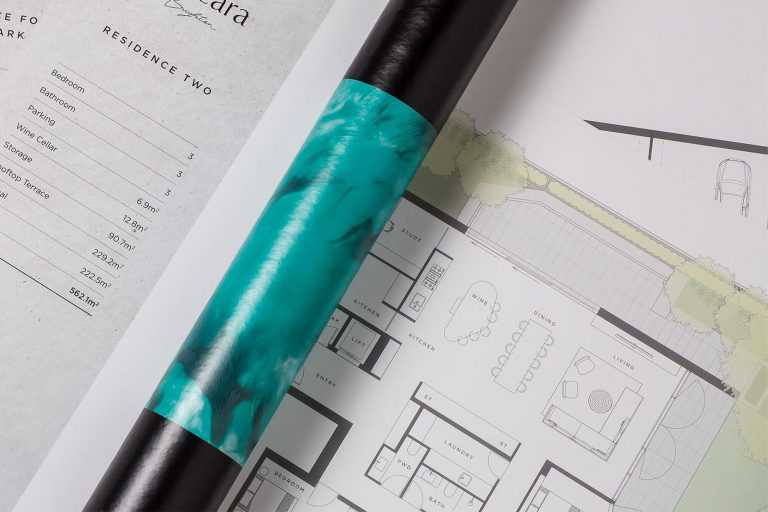
The related current service pathway is floor plans and virtual services. The following KB material describes that capability and its planning context. Historical dates, equipment, promotions and campaign examples in the archived article remain source-specific and are not presented as current offers.
The service page explicitly identifies real estate as a core market and also names developers, builders, architects and commercial agencies, including complex and higher-budget projects. Its FAQ extends the application to developments, commercial projects and large residential builds.
Published uses include showing buyers or stakeholders a property's layout through plans; creating dusk-style presentation when shooting conditions did not provide it; exploring a space before physical inspection; furnishing vacant interiors digitally; improving or altering image presentation; and supporting clients' photo or film production through studio hire. Virtual Styling examples span real estate, investment properties, first homes and high-end developments. The audiences viewing the assets are not necessarily the customers purchasing them. Source: service descriptions and FAQs
The FAQ directs image selections and amendment markups through DREAM. When proofs are available, an email links the customer to the images. Selected images proceed to post-production after submission. Pins and comments should identify the specific location and required change. Phone or email image selections are described as slower.
The service page says the collection can work within campaigns alongside Photography, Video, 3D Visualisation and Drone and Aerial. This does not establish that they are included in every package.
Practical inference: suitable source imagery is needed for image changes and access is needed for on-site capture. These sources do not state whether all client-supplied imagery is accepted, or specify a compulsory source-image format. Confirm inputs for each order. Sources: service integration, image selections and markups FAQ
Plan the next step
Explore current services · Photography · Video · Drone and aerial · Virtual services · Project workflow · FAQs · Contact Urban Angles
View the complete mirror page index
Images on This Page
-
https://www.urbanangles.com/wp-content/uploads/2023/01/UA_PIC-News_Logo3.png
picnews logo
-
https://www.urbanangles.com/wp-content/uploads/2020/12/insta.svg
(no alt text)
-
https://www.urbanangles.com/wp-content/uploads/2020/12/facebook.svg
(no alt text)
-
https://www.urbanangles.com/wp-content/uploads/2020/12/in.svg
(no alt text)
-
https://www.urbanangles.com/wp-content/uploads/2020/12/vimeo.svg
(no alt text)
-
https://www.urbanangles.com/wp-content/uploads/2023/02/MAGO1734_Shot1_3431-768x512.jpg
Real Estate Video
-
https://www.urbanangles.com/wp-content/uploads/2023/01/478482_20_Heyington_Place_Toorak_277-2-768x512.jpg
Real Estate Photography
-
https://www.urbanangles.com/wp-content/uploads/2022/02/Ancora_ExteriorRear_Cam01-768x512.jpg
Real Estate 3D Visualisation
-
https://www.urbanangles.com/wp-content/uploads/2021/01/Floorplans-768x512.jpg
Real Estate Floor plans & Virtual Services
-
https://www.urbanangles.com/wp-content/uploads/2023/07/airtif_CA228_OasisShoppingCentre_672-768x512.jpg
Real Estate Drone - Aerial
-
https://www.urbanangles.com/wp-content/uploads/2021/02/Hero-4.jpg
(no alt text)
-
https://www.urbanangles.com/wp-content/uploads/2021/02/image1.jpg
(no alt text)
-
https://www.urbanangles.com/wp-content/uploads/2021/02/image2.jpg
(no alt text)
-
https://www.urbanangles.com/wp-content/uploads/2021/02/UrbanAngles_Logo_CMYK_REV.png
(no alt text)
-
https://www.facebook.com/tr?id=538955803665778&ev=PageView&noscript=1
(no alt text)