Photography Checklist For Homeowners
Archived article. People, relative dates, sale status and availability below belong to the original story; this is not a current property listing or offer.
Your FREE real estate photography checklist.
Here at Urban Angles, we are passionate about helping you sell more property, faster, for more money. That’s why we’ve created a checklist for homeowners to use before a shoot, ensuring any home is ‘magazine ready’ before a photography appointment.
Print out, stick on your kitchen fridge and tick the list to prepare for your upcoming real estate photography shoot!
Click here to download our free Checklist
Preparing before the shoot
Download and print the linked pre-shoot checklist, then tick off its items before the appointment. For additional preparation advice, see Selling your home: tips from the pros, covering the entrance, clear surfaces, restrained styling, cleaning and indoor-outdoor access.
Standard retouching
Our Help and FAQs describes the following standard retouching items. Prepare the property before the shoot and specify any requested edits when ordering.
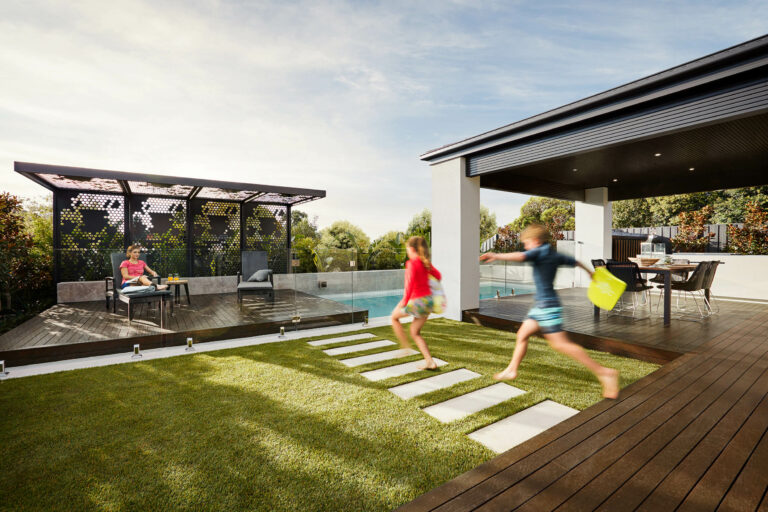
- Pools: making pools blue, removing pool cleaners and cleaning pool debris
- Grass and gardens: greening and repairing existing grass and vegetation
- Cords and hoses: removing obvious cords and fixed garden hoses (tell us where they are)
- Bins: removing external rubbish bins that genuinely could not be moved on site
- Marks: removing stickers on appliances, carpet indentations, flash and tripod reflections
- Windows: reducing glare or reflections and adding window detail
- Fireplaces: adding fire (say so when ordering)
- Signboards: blanking out or blurring agent signboards — note that full removal of a signboard is additional retouching beyond blanking or blurring
Where a request is specific to a location in the frame — a cord, a hose — naming the spot when you order saves a round of amendments.
What cannot simply be retouched away
Removing permanent external features — power lines, poles, signage, trees, fences, landscaping — requires your written confirmation accepting full legal responsibility, because such edits can misrepresent the property. That acceptance does not by itself make an edit appropriate for every use; think about where the image will be published before asking for it.
Timing and the light
Two published points are worth knowing before you pick a slot:
- Morning or afternoon can affect shadowing. Consider the orientation of the home and surrounding trees when discussing the booking.
- Dusk appointments commence within approximate ranges of 5:45–7:15 pm in summer and 2:15–3:45 pm in winter, shifting in roughly 15-minute increments through the year. These are scheduling ranges, not twilight durations. The FAQ explains that 6:30 pm in summer falls within its dusk booking allocation.
- Dawn is offered as an alternative intended to achieve a similar visual result when dusk availability is limited; confirm availability for your property.
If the property is vacant, Virtual Styling adds digital furniture to empty interiors (allow an additional 24 hours after the initial retouching stage). It changes the marketing image only — it does not style the property for inspection.
On the day, and afterwards
| Access | Confirmed 24 hours in advance — key safe, on-site meeting, key collection (fee applies) or no private access needed. You get a reminder the day before if details are missing |
| Adverse weather | Video and drone work is usually rescheduled; photography and floor-plan work usually proceeds. Adverse-weather rescheduling is free |
| Cancellation | $55 day photography with less than 3 hours' notice · $110 dusk photography, video or drone with less than 24 hours' notice |
| Turnaround | Final images by close of business the business day after the shoot — or the business day after selections, if you are proofing |
| Express | Before midday the next business day, for an additional charge. Request it when ordering; our FAQ requires at least 48 hours' notice. Not available on video |
| File retention | About 90 days, then removed — download and keep your own copies |
If you are proofing, you receive the captured set and choose which images go to post-production through DREAM; without proofing, the photographer selects against our own standards. Note that selections submitted after 5 pm count as received the next business day.
To request a change, use markup pins in DREAM — place the pin exactly where the change is needed and add a clear comment. Selections or amendments sent by email or phone are slower and do not process as quickly.
Related articles
| Category | Article | Read time |
|---|---|---|
| Styling | Selling Your Home? Here Are Some Tips From The Pros | 4 minute read |
| Marketing Tips | The Do's And Don't Of Image Retouching | 3 minute read |
| Marketing Tips | Still Photography | 3 minute read |
| Industry Insights | Reaching Top Spot On REA | 2 minute read |
Get in touch
For a new enquiry: Contact Urban Angles · Email studio@urbanangles.com · Call 1300 144 255
Our customer support operates Monday to Friday, 8:30 am–5:30 pm. For same-day rescheduling, use the phone.
Photography · Help and FAQs · Products and services
Who is the photography checklist for?
Homeowners preparing a property for a photography appointment.
How does the article suggest using it?
Print the checklist, put it on the kitchen fridge and tick off the items while preparing for the shoot.
Where is the checklist available?
The article links to the pre-shoot checklist PDF (https://www.urbanangles.com/wp-content/uploads/2021/02/UA-Pre-Shoot-Checklist.pdf). Its detailed checklist items are not reproduced in the article text.
When are the finished files delivered?
On our current published terms, photography files are available by close of business on the business day after the shoot. With proofing, the clock starts when selections are submitted, and selections after 5 pm count as the next business day.
Can delivery be brought forward?
Express delivery before midday on the next business day is available for an additional charge. It must be requested at the time of order and at least 48 hours before the booking, and it is not available on video.
How do I request a change to an image?
Image selections and markup pins go through DREAM. Place the pin on the part of the image that needs attention and add a clear comment, which reaches the team member scheduled to retouch it.
How long are the delivered files kept?
Final assets are kept for about 90 days and then removed, so download and store them in your own system. That is approximate published guidance rather than a contractual retention period.
How much notice do you need for property access?
Access details are needed 24 hours in advance. A contact name and phone number helps our field crew resolve problems such as finding the property or coordinating arrival.
What does standard retouching include?
Our published list covers removing flash and tripod reflections, reducing window glare and adding window detail, removing appliance stickers and carpet indentations, making pools and ocean blue, removing pool cleaners and debris, greening or repairing existing vegetation, and adding a fire where specified. Cords and fixed hoses need their locations identified.
What cannot be retouched out?
Removing permanent external features such as power lines, poles, signage, trees, fences or landscaping requires your written confirmation accepting full legal responsibility, because such edits can misrepresent a property. That acceptance does not by itself make an edit appropriate for every use.
How do I start a project with you?
Share the property or development address, the services you need, the campaign channels, any access constraints and your preferred delivery date. We will confirm scope, availability and price on a current quote before anything is booked.
Images on This Page
-
https://www.urbanangles.com/wp-content/uploads/2023/01/UA_PIC-News_Logo3.png
picnews logo
-
https://www.urbanangles.com/wp-content/uploads/2020/12/insta.svg
(no alt text)
-
https://www.urbanangles.com/wp-content/uploads/2020/12/facebook.svg
(no alt text)
-
https://www.urbanangles.com/wp-content/uploads/2020/12/in.svg
(no alt text)
-
https://www.urbanangles.com/wp-content/uploads/2020/12/vimeo.svg
(no alt text)
-
https://www.urbanangles.com/wp-content/uploads/2023/02/MAGO1734_Shot1_3431-768x512.jpg
Real Estate Video
-
https://www.urbanangles.com/wp-content/uploads/2023/01/478482_20_Heyington_Place_Toorak_277-2-768x512.jpg
Real Estate Photography
-
https://www.urbanangles.com/wp-content/uploads/2022/02/Ancora_ExteriorRear_Cam01-768x512.jpg
Real Estate 3D Visualisation
-
https://www.urbanangles.com/wp-content/uploads/2021/01/Floorplans-768x512.jpg
Real Estate Floor plans & Virtual Services
-
https://www.urbanangles.com/wp-content/uploads/2023/07/airtif_CA228_OasisShoppingCentre_672-768x512.jpg
Real Estate Drone - Aerial
-
https://www.urbanangles.com/wp-content/uploads/2021/01/hero.jpg
(no alt text)
-
https://www.urbanangles.com/wp-content/themes/urban_angles/img/svg/banner_center.svg
(no alt text)
-
https://www.urbanangles.com/wp-content/uploads/2021/01/Image1.jpg
(no alt text)
-
https://www.urbanangles.com/wp-content/uploads/2021/01/Image2-1024x695.jpg
(no alt text)
-
https://www.urbanangles.com/wp-content/uploads/2021/02/UrbanAngles_Logo_CMYK_REV.png
(no alt text)